RTK - base/rover with U-blox GNSS receivers
After some tests with Precise Point Positioning ( see below 1-5 ) and in detailed with (4) I describe this time a setup with a base station sending RTCM (Radio Technical Commission for Maritime Services) data to a rover station. For both ( base and rover ) I use Raspberry Pi’s with a GNSS pi-hat with the latest Debian OS trixie Version 13 and the latest Version of https://gitlab.com/gpsd/gpsd. I also use github.com/rtklibexplorer/RTKLIB written by Jens Reimann. It’s not necessary to have this tool on these servers. Most most of the time, I run it from a third server, using ‘ubxtool’ to interact with the gpsd instances remotely.
Base station is a Raspberry Pi5 with a ZED-X20P from U-blox. The pi-hat is from sparkfun.
Rover is a Raspberry Pi4 with a ZED-F9P from U-blox. The pi-hat is from uputronics.
OS is in both cases Debian 13 (trixie)
Antennas
For X20P I use the antenna HAB-ANN-MB2 permanently roof-mounted with a clear sky view.
F9P uses the HAB-ANN-MB-00-00 antenna, which is moved mobile in the garden. To place it on a metal plate is an advantage.
In both cases I use the second interface UART2 to communicate between base and rover for the RTCM traffic. How to setup I described in second interface for u-blox receiver
I use str2str for communication between both systems. It is started in background with option “–deamon”, see below.
Note: In RTKLIB’s str2str, the parameter is literally spelled –deamon instead of –daemon.
The data path for RTCM traffic looks like this:
X20P/UART2 --- str2str --- TCP/IP --- str2str --- UART2/F9P
Bandwidth is about 12 Kb from base to rover and 1.5 Kb from rover to base
In advance I want to say that this combination with ZED-X20P and ZED-F9P is not perfect but possible. The reasons are multiple: ZED-F9P can handle only the L1 and L2 band. ZED-X20P is designed for L1/L2/L5/E6/B3/L. Another reason is that ZED-X20P cannot handle GLONASS (Globalnaja nawigazionnaja sputnikowaja sistema) at the moment (and potentially never due to hardware/firmware focus or political situations). And the Navigation Indian Constellation (NavIC) can only be used by ZED-X20P. Independent of that I don’t see any Indian satellite here in Vienna ( 48N 16E ). Therefore, only 3 GNSS constellations remain: GPS, Galileo and BeiDou as lowest common denominator and common source.
Below you can find 2 scripts: setup_base_sh and setup_rover_sh. The first one is to setup the base station which is a little bit more complex. The second one is for the rover. These scripts require certain prerequisites. For example there are servers with hostname “base” and “rover” or at least an DNS CNAME for it. SSH should be possible without password.
functubxtool_ksh defines a function “ubxtool” like this
    export UBXOPTS='-P 27.50'
    /usr/local/bin/ubxtool $@ rover:gpsd:/dev/serial0
This is to avoid to add each time “rover:gpsd:/dev/serial0” as additional argument
setup_base_sh
#!/usr/bin/env bash

# ident setup_base_sh
# Wed May  6 05:26:22 PM CEST 2026 - mayer

. functubxtool_ksh base

ntrip(){

  logger -p user.debug "setup_base_sh ntrip with argument $1  "

  case "$1" in
    stop )
        # kill a possible running str2str
        ssh base pkill str2str
        ;;
    start )
        # start a new one - this is the communication to the rover for RTCM traffic
        ssh base "str2str -in serial://ttyAMA3:921600:8:n:1:off -out tcpsvr://:42101 --deamon"
        ;;
    status )
        ssh base 'pgrep -a -f "str2str -in serial://ttyAMA3:921600:8:n:1:off -out tcpsvr://:42101 --deamon"'
        ;;
    "" )
        ntrip stop ; ntrip start
        ;;
  esac
}


setup_initial(){

  # Setup Script for u-blox (ZED-X20P) base station
  logger -p user.debug "setup_base_sh setup_initial "
  # this is the initial setup to prepare the base station for it's function

  # make sure in advance that baudrate for uart1 is high enough
  if test -z "`ubxtool -g  CFG-UART1-BAUDRATE | grep UART1-BAUDRATE | head -1 | grep 921600`"
    then
      echo $0: UART1-BAUDRATE,921600 failed
      exit 1
  fi

  ubxtool -z  CFG-UART2-BAUDRATE,921600 | grep UBX-ACK-ACK:

  if test $? -ne 0
    then
      echo $0: UART2-BAUDRATE,921600 failed
      exit 1
  fi

  # make sure that no Survey-In is running
  ubxtool -z CFG-TMODE-MODE,0 | grep UBX-ACK-ACK:

  # reference coordinates set to ECEF
  ubxtool -z CFG-TMODE-POS_TYPE,0 | grep UBX-ACK-ACK:

  # position of the base station , unit is cm
  # 48.1493013022 16.2838442507 288.08
  # make sure that there is the exact position of the base station
  ubxtool -z CFG-TMODE-ECEF_X,409252331 | grep UBX-ACK-ACK:
  ubxtool -z CFG-TMODE-ECEF_Y,119548502 | grep UBX-ACK-ACK:
  ubxtool -z CFG-TMODE-ECEF_Z,472818312 | grep UBX-ACK-ACK:

  # set  High-Precision Register to zero
  ubxtool -z CFG-TMODE-ECEF_X_HP,0 | grep UBX-ACK-ACK:
  ubxtool -z CFG-TMODE-ECEF_Y_HP,0 | grep UBX-ACK-ACK:
  ubxtool -z CFG-TMODE-ECEF_Z_HP,0 | grep UBX-ACK-ACK:

  # RTCM data (1 Hz Intervall )
  # activate RTCM3 output on UART2 (Port 2) , communication with str2str
  # 1005: Station ID & Position,
  # 1077: GPS MSM7
  # 1097: Galileo GAL MSM7
  # 1124: BeiDou BDS MSM4 included in 1127
  # 1127: BeiDou BDS MSM7
  for MSG in 1005 1077 1097 1127 # 1124
    do
      ubxtool -z CFG-MSGOUT-RTCM_3X_TYPE${MSG}_UART2,1  | grep UBX-ACK-ACK:
    done

  # to check what the rover sees
  # rover# ubxtool -w 30 | grep -A 1 "UBX-RXM-RTCM" | sort -u

  # FIXED MODE schalten
  ubxtool -z CFG-TMODE-MODE,2 | grep UBX-ACK-ACK:

  # necessary as the rover (ZED-F9P) can only bands L1 and L2
  ubxtool -z CFG-SIGNAL-PLAN,1 | grep UBX-ACK-ACK:

  ubxtool -z CFG-SIGNAL-GPS_ENA,1 | grep UBX-ACK-ACK:
  ubxtool -z CFG-SIGNAL-SBAS_ENA,0 | grep UBX-ACK-ACK:
  ubxtool -z CFG-SIGNAL-GAL_ENA,1 | grep UBX-ACK-ACK:
  ubxtool -z CFG-SIGNAL-BDS_ENA,1 | grep UBX-ACK-ACK:
  ubxtool -z CFG-SIGNAL-QZSS_ENA,0 | grep UBX-ACK-ACK:
  ubxtool -z CFG-SIGNAL-GLO_ENA,0 | grep UBX-ACK-ACK:
  ubxtool -z CFG-SIGNAL-NAVIC_ENA,0 | grep UBX-ACK-ACK:
  ubxtool -z CFG-SIGNAL-BDS_B2A_ENA,0 | grep UBX-ACK-ACK:

  ubxtool -z CFG-SIGNAL-GPS_L1CA_ENA,1 | grep UBX-ACK-ACK:
  ubxtool -z CFG-SIGNAL-GPS_L2C_ENA,1 | grep UBX-ACK-ACK:
  ubxtool -z CFG-SIGNAL-GPS_L5_ENA,1 | grep UBX-ACK-ACK:
  ubxtool -z CFG-SIGNAL-SBAS_L1CA_ENA,0 | grep UBX-ACK-ACK:
  ubxtool -z CFG-SIGNAL-GAL_E1_ENA,1 | grep UBX-ACK-ACK:
  ubxtool -z CFG-SIGNAL-GAL_E5A_ENA,1 | grep UBX-ACK-ACK:
  ubxtool -z CFG-SIGNAL-GAL_E5B_ENA,0 | grep UBX-ACK-ACK:
  ubxtool -z CFG-SIGNAL-GAL_E6_ENA,1 | grep UBX-ACK-ACK:
  ubxtool -z CFG-SIGNAL-BDS_B1_ENA,1 | grep UBX-ACK-ACK:
  ubxtool -z CFG-SIGNAL-BDS_B2_ENA,1 | grep UBX-ACK-ACK:
  ubxtool -z CFG-SIGNAL-BDS_B1C_ENA,0 | grep UBX-ACK-ACK:
  ubxtool -z CFG-SIGNAL-BDS_B3_ENA,0 | grep UBX-ACK-ACK:
  ubxtool -z CFG-SIGNAL-QZSS_L1CA_ENA,0 | grep UBX-ACK-ACK:
  ubxtool -z CFG-SIGNAL-QZSS_L1S_ENA,0 | grep UBX-ACK-ACK:
  ubxtool -z CFG-SIGNAL-QZSS_L2C_ENA,0 | grep UBX-ACK-ACK:
  ubxtool -z CFG-SIGNAL-QZSS_L5_ENA,0 | grep UBX-ACK-ACK:
  ubxtool -z CFG-SIGNAL-GLO_L1_ENA,0 | grep UBX-ACK-ACK:
  ubxtool -z CFG-SIGNAL-GLO_L2_ENA,0 | grep UBX-ACK-ACK:
  ubxtool -z CFG-SIGNAL-NAVIC_L5_ENA,0 | grep UBX-ACK-ACK:

  ntrip

}

help(){
  echo "usage: $0 help | setup_initial | ntrip "
  echo "          help  ...  this help "
  echo "          setup_initial ... this will initialise the base station "
  echo '          ntrip start | stop | status | "" '
  echo "                to manage the communication with the base station with a str2str process "
  echo "                without argument it will restart the str2str process "
  exit 1
}

usage(){
  echo "usage: $0 help | setup_initial | ntrip "
  exit 1
}


case "$1" in
  setup_initial ) setup_initial ;;
  ntrip ) ntrip $2 ;;
  help ) help ;;
  * ) usage ;;
esac
Some hints on the base station setup. The unit of measurement for ECEF mode is centimeters. Note that most tools like mine transform ecef wgs84 use meters instead. Another important setup is to disable CFG-SIGNAL-BDS_B1C_ENA and CFG-SIGNAL-BDS_B3_ENA. As long as these signals were enabled, I was unable to achieve BeiDou-based RTCM corrections.
setup_rover_sh
#!/usr/bin/env bash

# ident setup_rover_sh
# Wed May  6 05:26:22 PM CEST 2026 - mayer

. functubxtool_ksh rover


ntrip(){

  logger -p user.debug "setup_rover_sh ntrip with argument $1  "
  case "$1" in
    stop )
  	# kill a possible running str2str
  	# ssh rover pkill str2str
	ssh rover 'pkill -f "str2str -in tcpcli://base:42101 -out serial://ttyAMA5:921600:8:n:1:off --deamon"'
	;;
    start )
  	# start a new one - this is the communication to the base for RTCM traffic
  	ssh rover "str2str -in tcpcli://base:42101 -out serial://ttyAMA5:921600:8:n:1:off --deamon"
	;;
    status )
	ssh rover 'pgrep -a -f "str2str -in tcpcli://base:42101 -out serial://ttyAMA5:921600:8:n:1:off --deamon"'
	;;
    "" )
	ntrip stop ; ntrip start
	;;
  esac
}

setup_initial(){

  logger -p user.debug "setup_rover_sh setup_initial "
  # this is the initial setup to prepare the rover sation for it function

  # make sure in advance that baudrate for uart1 is high enough
  if test -z "`ubxtool -g  CFG-UART1-BAUDRATE | grep UART1-BAUDRATE | head -1 | grep 921600`"
    then
      echo $0: UART1-BAUDRATE,921600 failed
      exit 1
  fi

  ubxtool -z  CFG-UART2-BAUDRATE,921600 | grep UBX-ACK-ACK:

  if test $? -ne 0
    then
      echo $0: UART2-BAUDRATE,921600 failed
      exit 1
  fi

  # is set per default layer 7
  ubxtool -z CFG-UART2INPROT-RTCM3X,1  | grep UBX-ACK-ACK:

  # disable not usable GNSS
  ubxtool -z  CFG-SIGNAL-SBAS_ENA,0 | grep UBX-ACK-ACK:
  ubxtool -z  CFG-SIGNAL-QZSS_ENA,0 | grep UBX-ACK-ACK:
  ubxtool -z  CFG-SIGNAL-GLO_ENA,0 | grep UBX-ACK-ACK:

  ubxtool -z  CFG-SIGNAL-SBAS_L1CA_ENA,0 | grep UBX-ACK-ACK:
  ubxtool -z  CFG-SIGNAL-QZSS_L1CA_ENA,0 | grep UBX-ACK-ACK:
  ubxtool -z  CFG-SIGNAL-QZSS_L1S_ENA,0 | grep UBX-ACK-ACK:
  ubxtool -z  CFG-SIGNAL-QZSS_L2C_ENA,0 | grep UBX-ACK-ACK:
  ubxtool -z  CFG-SIGNAL-GLO_L1_ENA,0 | grep UBX-ACK-ACK:
  ubxtool -z  CFG-SIGNAL-GLO_L2_ENA,0 | grep UBX-ACK-ACK:

  ntrip

  ubxtool -z CFG-MSGOUT-UBX_RXM_RTCM_UART1,1 | grep UBX-ACK-ACK:

  # set high precision mode
  # The accuracy is only as good as that of the base station.
  ubxtool -z CFG-NMEA-HIGHPREC,1 | grep UBX-ACK-ACK:
  ubxtool -z CFG-MSGOUT-UBX_NAV_HPPOSLLH_UART1,1 | grep UBX-ACK-ACK:

  # don't restart gpsd after initialization
  # this is one of the parameters changed at start or use option -p --passive for gpsd restart
  ubxtool -z CFG-MSGOUT-NMEA_ID_GGA_UART1,1  | grep UBX-ACK-ACK:

}

nmea_pipe(){

  logger -p user.debug "setup_rover_sh nmea_pipe with argument $1  "
  # this pipe is for monitoring with rtkplot_q

  case "$1" in
    stop )
  	# kill a possible running gpspipe
  	ssh rover "pkill -f 'socat EXEC:gpspipe -r TCP-LISTEN:10001,reuseaddr,fork'"
	;;
    start )
  	# start a gpspipe for monitoring with rtkplot_qt / option -r is NMEA output
  	ssh rover nohup "socat EXEC:'gpspipe -r' TCP-LISTEN:10001,reuseaddr,fork  > /dev/null 2>&1 & disown "
	echo pipe ready for rtkplot_qt as TCP Client , server rover at port 10001 and solution format NMEA0183
 	;;
    status )
	ssh rover 'pgrep -a -f "socat EXEC:gpspipe -r TCP-LISTEN:10001,reuseaddr,fork"'
 	;;
    "" )
	nmea_pipe stop ; nmea_pipe start
 	;;
  esac
}

raw_pipe(){

  logger -p user.debug "setup_rover_sh raw_pipe  with argument $1  "

  case "$1" in
    stop )
  	# kill a possible running gpspipe
  	ssh rover "pkill -f 'socat EXEC:gpspipe -RB TCP-LISTEN:10002,reuseaddr,fork'"
	;;
    start )
  	# start a gpspipe for logging with strsvr_qt or str2str
  	ssh rover nohup "socat EXEC:'gpspipe -RB' TCP-LISTEN:10002,reuseaddr,fork  > /dev/null 2>&1 & disown "
  	echo for example its possible to start now: str2str -in tcpcli://rover:10002 -out file://log_%Y%m%d%h%M.ubx
	;;
    status )
  	ssh rover "pgrep -a -f 'socat EXEC:gpspipe -RB TCP-LISTEN:10002,reuseaddr,fork'"
	;;
    "" )
	raw_pipe stop ; raw_pipe start
	;;
  esac
}


navpvt(){
  logger -p user.debug "setup_rover_sh navpvt "
  ubxtool -p NAV-PVT -v 2 | sed -n -e '/^UBX-NAV-PVT:/,/^$/ p' | awk -v RS= 'NR==2'
}


sat_used(){

  logger -p user.debug "setup_rover_sh sat_used "

  # NAVSAT=`ubxtool -p NAV-SAT -v 2 | sed -n -e '/^UBX-NAV-SAT:/,/^$/ p' | awk -v RS= 'NR==2'  | grep -B 2 -A 2  -i rtcm | egrep 'flags'`

  echo only GPS, Galileo and BeiDou are counted
  echo -e -n Status: ; navpvt | grep carrSoln
  NAVSAT=`ubxtool -p NAV-SAT -v 2 | sed -n -e '/^UBX-NAV-SAT:/,/^$/ p' | awk -v RS= 'NR==2' `

  echo "                    satellites total seen : " `echo "$NAVSAT" | grep -c gnssId `

  SYST=`echo "$NAVSAT" | grep gnssId  | awk '{ print ( $2 ) }' | sort | uniq -c`
  echo $SYST | awk '{ print ( "                                      GPS :  "  $1 "  Galileo: " $3  "  BeiDou: " $5 ) }'

  echo "                          satellites used : " `echo "$NAVSAT" | grep 'flags(' | grep -c svUsed `

  SYST=`echo "$NAVSAT" | grep  -B 2 svUsed | grep gnssId  | awk '{ print ( $2 ) }' | sort | uniq -c`
  echo $SYST | awk '{ print ( "                                      GPS :  "  $1 "  Galileo: " $3  "  BeiDou: " $5 ) }'

  echo "     satellites used with RTCM correction : " `echo "$NAVSAT" | grep -c rtcm `
  echo "  satellites with pseudorange corrections : " `echo "$NAVSAT" | grep -c prCorrUsed `

  echo "satellites with carrier range corrections : " `echo "$NAVSAT" | grep -c crCorrUsed `
  SYST=`echo "$NAVSAT" | grep  -B 2 crCorrUsed | grep gnssId  | awk '{ print ( $2 ) }' | sort | uniq -c`
  echo $SYST | awk '{ print ( "                                      GPS :  "  $1 "  Galileo: " $3  "  BeiDou: " $5 ) }'
}

help(){
  echo "usage: $0 help | setup_initial | nmea_pipe | raw_pipe | sat_used | navpvt | ntrip "
  echo "          help  ... this help "
  echo "          setup_initial ... this will initialise the base station "
  echo "          nmea_pipe ... this will create a gpspipe with NMEA protocol listen on port 10001 "
  echo "          raw_pipe ... this will create a gpspipe with raw data listen on port 10002 "
  echo "          sat_used ... will show the used satellites based on ubxtool -p NAV-SAT command "
  echo "          navpvt ... will show the status based on ubxtool -p NAV-PVT command "
  echo '          ntrip start | stop | status | "" '
  echo "                to manage communication between base station and rover with a str2str process "
  echo "                without argument it will restart the str2str process "
  exit 1
}

usage(){
  echo "usage: $0 help | setup_initial | nmea_pipe | raw_pipe | sat_used | navpvt | ntrip "
  exit 1
}


case "$1" in
  setup_initial ) setup_initial ;;
  nmea_pipe ) nmea_pipe "$2" ;;
  raw_pipe ) raw_pipe "$2" ;;
  sat_used ) sat_used ;;
  navpvt ) navpvt ;;
  ntrip ) ntrip "$2" ;;
  help ) help ;;
  * ) usage ;;
esac
Usage
setup_initial
Both scripts setup_base_sh and setup_rover_sh has to be run with this option. If this is done a communication between setup_base_sh and setup_rover_sh is established and a “Fixed” solution should be reached within a short time.
The following options are just for the rover.
nmea_pipe
After setting up base and rover it will take some time to get a precision position with status Fixed. Worst case is one hour in my situation. But typically it takes 10 minutes or a little bit more. Running command setup_rover_sh nmea_pipe will create a gpspipe with socat EXEC:gpspipe -r TCP-LISTEN:10001,reuseaddr,fork. Running rtkplot_qt & and connecting to this port 10001 at server rover will show you the current position at the rover.
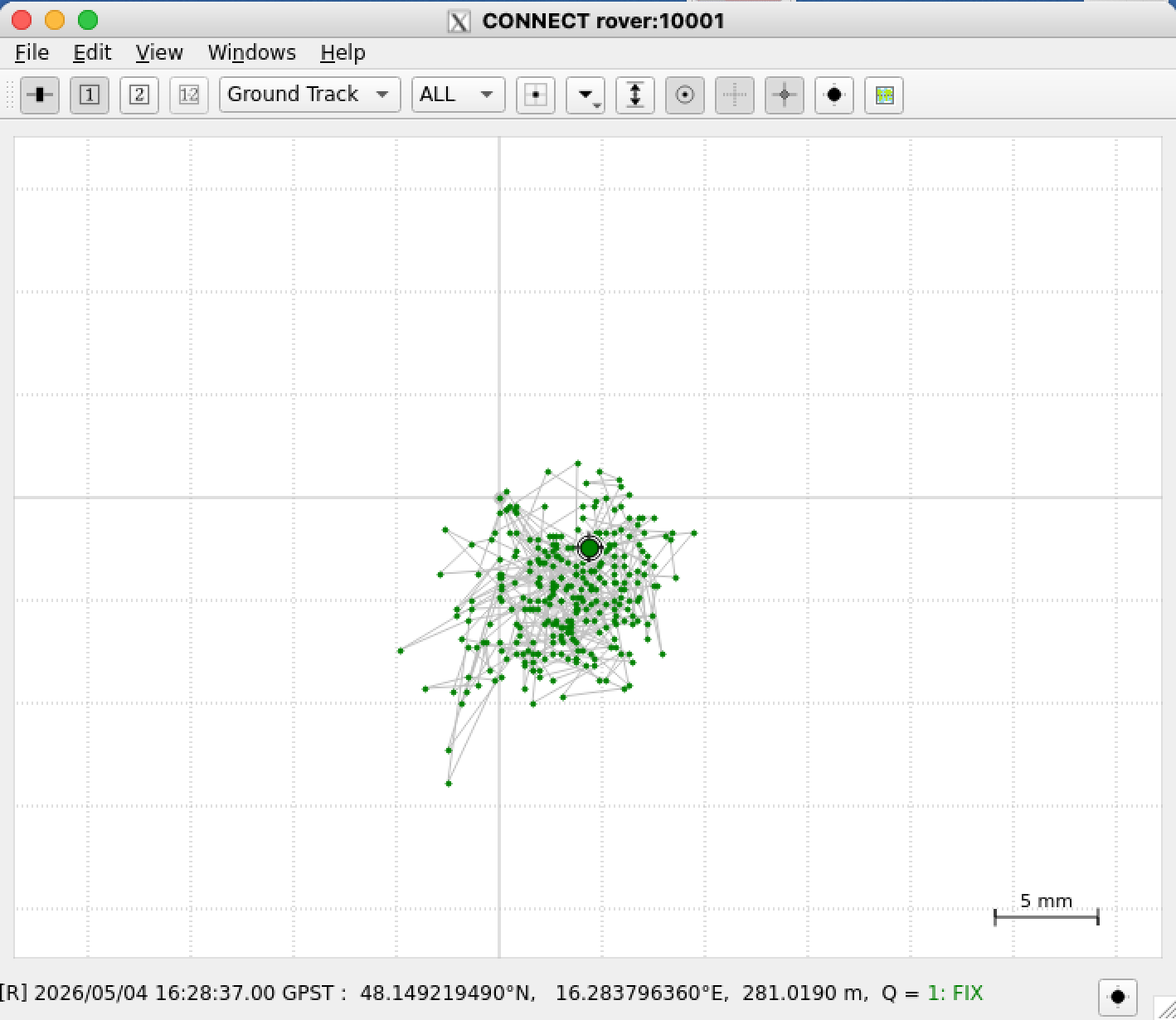
The graph above shows the measurement for a short period of time. Each data point represents a one-second interval. As we can see almost all dots are within a circle of 5 mm radius. Moving the rover antenna by 3 cm results in a distinct new cluster of points, precisely reflecting the displacement. If the antenna is moved further away - for example one meter - then the status “Fixed” is lost and falls back to “Floating”.
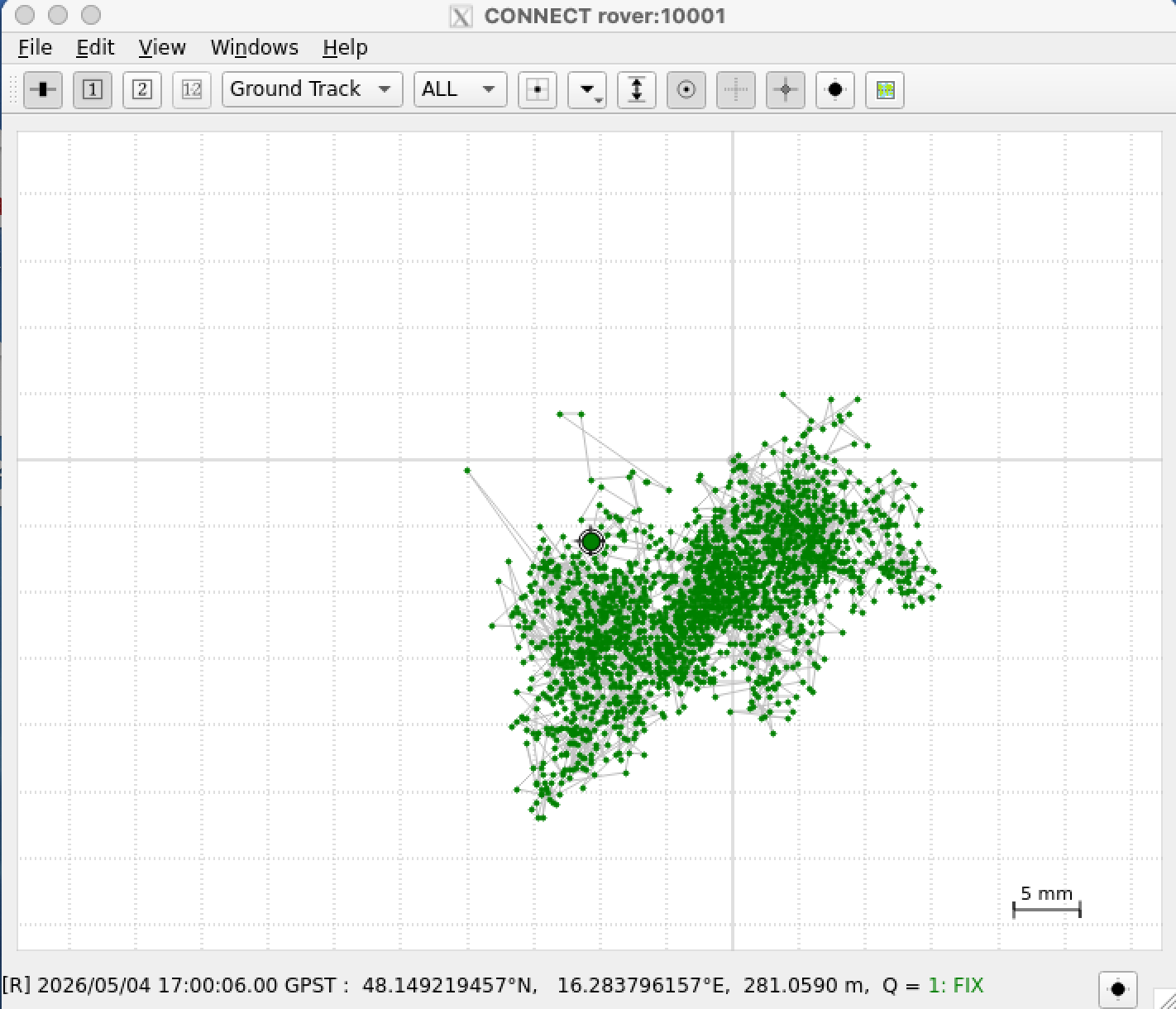
The example above shows a longer period of time and we can see that all dots are in a square of 3 x 3 cm.
sat_used
With option sat_used will give you the information how many satellites are used. A typical output could be this:
only GPS, Galileo and BeiDou are counted
Status:    carrSoln (Fixed)
                    satellites total seen :  38
                                      GPS :  11  Galileo: 11  BeiDou: 16
                          satellites used :  26
                                      GPS :  10  Galileo: 6  BeiDou: 10
     satellites used with RTCM correction :  26
  satellites with pseudorange corrections :  26
satellites with carrier range corrections :  21
                                      GPS :  7  Galileo: 6  BeiDou: 8
In the example above we see a status fixed. I have never seen more than 25 satellites with carrier range corrections. Maybe this is a limitation from the U-blox receiver or there are never more than 25 satellites available with the needed requirements.
There are 3 states possible
    carrSoln (None)
    carrSoln (Floating)
    carrSoln (Fixed)
Status “None” is only visible short time after power on. Fixed is of course our goal.
raw_pipe
Using option raw_pipe will create a second gpspipe. This will allow to use
str2str -in tcpcli://rover:10002 -out file://log_%Y%m%d%h%M.ubx which logs the data to file. Then it’s possible to extract data in a future process.
navpvt
navpvt show the output of command “ubxtool -p NAV-PVT”
UBX-NAV-PVT:
  iTOW 576850000 time 2026/05/02 16:13:52 valid x37
  tAcc 24 nano 341196 fixType 3 flags x83 flags2 xea
  numSV 29 lon 162837865 lat 481492049 height 277494
  hMSL 235357 hAcc 15 vAcc 24
  velNED 2 2 16 gSpeed 3 headMot 24410926
  sAcc 131 headAcc 18000000 pDOP 119 flags3 x4 reserved0 x334c2e2c
  headVeh 0 magDec 0 magAcc 0
    valid (validDate ValidTime fullyResolved)
    fixType (3D)
    flags (gnssFixOK, diffSoln, Carrier Phase fixed,)
    flags2 (confirmedAvai confirmedDate confirmedTime)
    psmState (Not Active)
    carrSoln (Fixed)
    flags3 () lastCorrectionAge 2
help
usage: ./setup_rover_sh help | setup_initial | nmea_pipe | raw_pipe | sat_used | navpvt | ntrip
          help  ... this help
          setup_initial ... this will initialise the base station
          nmea_pipe ... this will create a gpspipe with NMEA protocol listen on port 10001
          raw_pipe ... this will create a gpspipe with raw data listen on port 10002
          sat_used ... will show the used satellites based on ubxtool -p NAV-SAT command
          navpvt ... will show the status based on ubxtool -p NAV-PVT command
          ntrip start | stop | status | ""
                to manage communication between base station and rover with a str2str process
                without argument it will restart the str2str process
some internal links
These are some possibilities to look for a precise point position. Definitelly one needs to have one exact position for the base station in a rover/base setup.
(1) PPP - Precise Point Positioning with averaging
(2) PPP with gpsrinex, CSRS-PPP and ECTT
(3) PPP with RTKlib and local correction
(4) PPP with NTRIP source for u-blox GNSS receiver over gpsd
(5) High Precision Positioning with RTK and rtknavi_qt
Tools at github:
A commandline tool to transform ecef wgs84 data.