High Precision Positioning with RTK and rtknavi_qt
This is now my fifth attempt and probably the last one to get a high precision position (using RTK) of my stationary GNSS antenna on the roof of my house.
You can find the methods I used previously in my blogs here:
(1) PPP - Precise Point Positioning with averaging
(2) PPP with gpsrinex, CSRS-PPP and ECTT
(3) PPP with RTKlib and local correction
(4) PPP with NTRIP source for u-blox GNSS receiver over gpsd
As GNSS receiver I used my brand new u-blox ZED-X20P
to manage this device I use the gpsd package.
The method is quite simple. Use rtknavi_qt to configure a rover / base station setup. Rover is the own GNSS receiver with a stationary antenna. The base station is an external RTCM stream. So feed RTCM data as a NTRIP ( Networked Transport of RTCM via Internet Protocol ) stream to rtknavi_qt. rtknavi_qt is part of the package RTKlib which can be found here github.com/rtklibexplorer/RTKLIB. I run it on Debian Linux.
To do so, one must use any NTRIP caster. There are several available for free and of course also some commercial. In any case you have to register as you need username and password.
This method doesn’t differ much from method (4). The main difference: processing is now handled by rtknavi_qt, whereas in (4) it was calculated on-board by the u-blox receiver itself.
To prepare my u-blox for this task, I run the following commands to enable RAWX and SFRBX messages:
ubxtool -z CFG-MSGOUT-UBX_RXM_SFRBX_UART1,1 | grep ACK-ACK
ubxtool -g CFG-MSGOUT-UBX_RXM_SFRBX_UART1 | grep UART
ubxtool  | grep SFRBX

ubxtool -z CFG-MSGOUT-UBX_RXM_RAWX_UART1,1 | grep ACK-ACK
ubxtool -g CFG-MSGOUT-UBX_RXM_RAWX_UART1 | grep UART
ubxtool  | grep RAWX

# DYNMODEL stationary
ubxtool -z CFG-NAVSPG-DYNMODEL,2 | grep ACK-ACK
ubxtool -g CFG-NAVSPG-DYNMODEL | grep CFG-NAVSPG-DYNMODEL
Now configure rtknavi_qt
Open rtknavi_qt & and new window will appear.
Click on Options... on the bottom left side there is a Load... button. Load the file f9p_ppk.conf which comes with the source tree. Some of the settings I changed. Positioning Mode I set to Static as my antenna is fix mounted. As Navigation Systems I selected GPS, Galileo and BDS. This should fit what the base station is delivering. In the Positions tab for Base Station I selected RTCM/Raw Antenna Position. It is also possible to set Lat/Lon/height or X/Y/Z but as long as the base station is propagating its own position “RTCM/Raw Antenna Position” is the easy way.
Back in the main menu press I for input streams. Select Rover with TCP Client as Stream Type. As Stream Options enter IP address and port number where you start the following process
socat EXEC:'gpspipe -RB' TCP-LISTEN:10001,reuseaddr,fork &
and Format u-blox UBX
gpspipe must be able to connect to the own gpsd process and socat offers this data on port 10001
It would be possible too to connect rtknavi_qt via the serial port to the X20P directly. But then the gpsd process has to be stoppped. I like to have still the possibility to communicate via ubxtool to the GNSS receiver even if another task is running.
The base station is NTRIP Client, in Stream Options enter Caster Address, port, mountpoint, user name and password what you want to use. Format is RTCM 3.
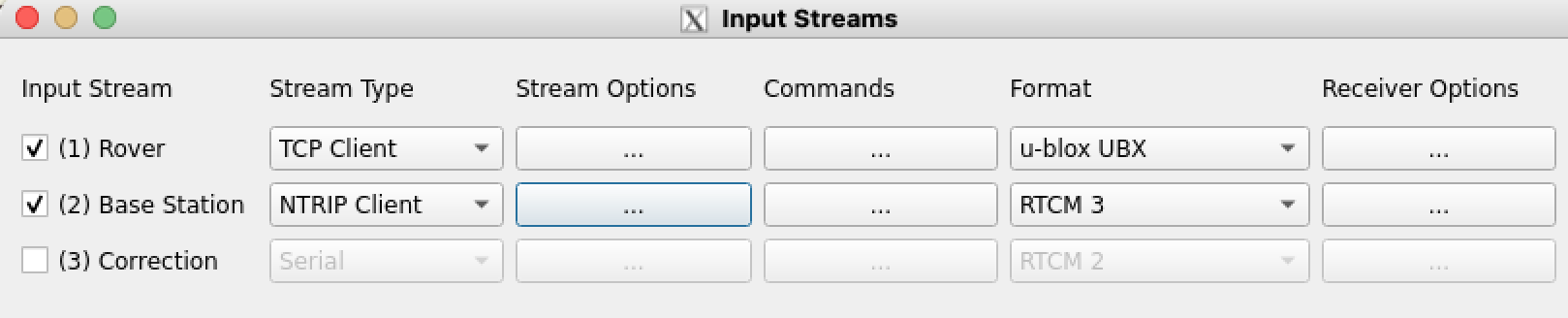
Press the “OK” button. Ideally save the new configuration with a new name in the options tab.
Now it’s time to press the Start button. Very soon I get as solution “float”. But it took almost every time up to 30 minutes to get status FIX. So take a coffee or do something useful in the meantime.
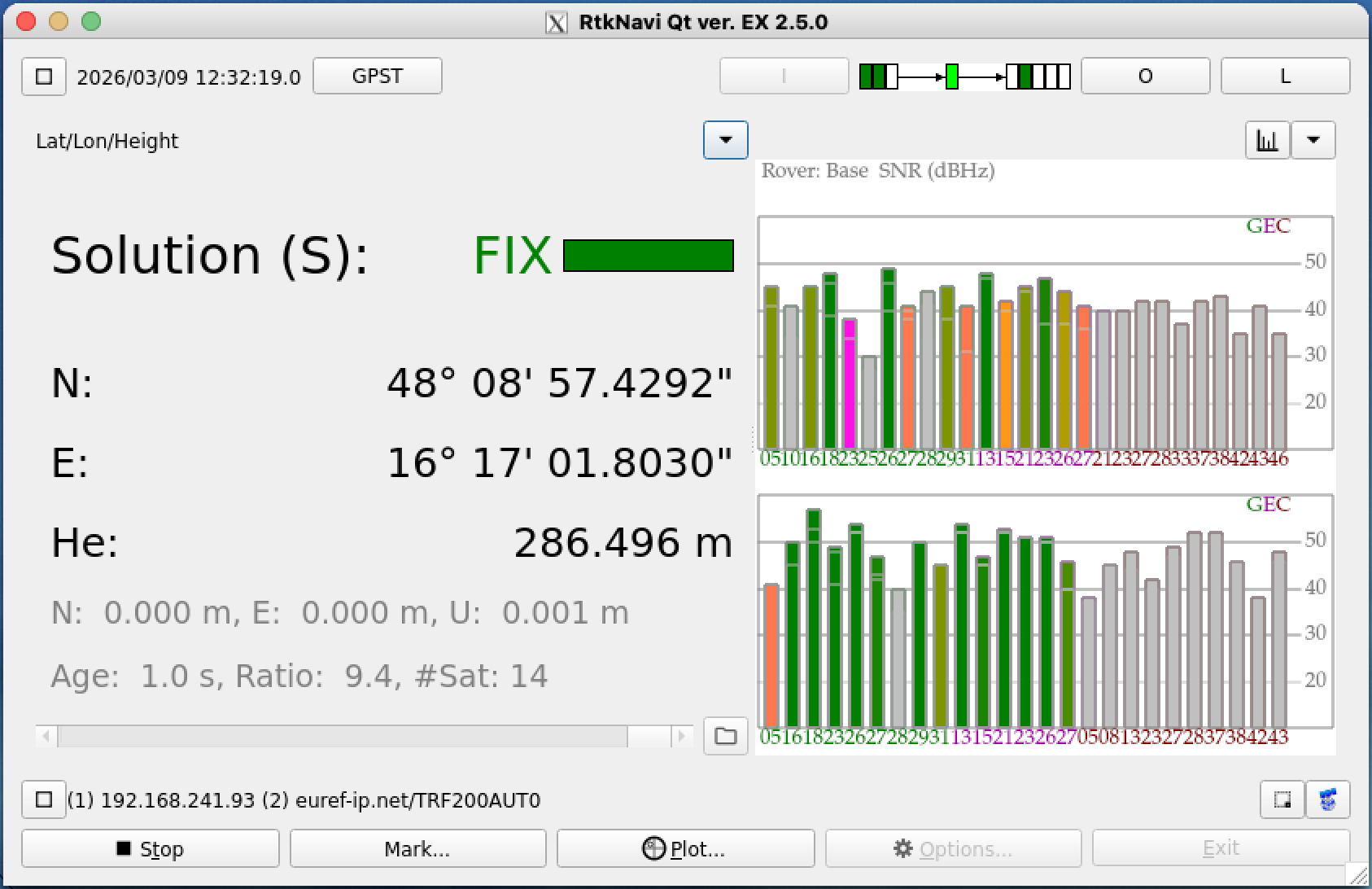
Even I can see 40 or more satellites normally only 14 of them are used for calculation. If not enough satellites are available a “FIX” could fail completely.
Press the O button to define an output stream if you want to document the results.
I have done this several times and this is the result
| date | latitude | longitude | altitude |
|---|---|---|---|
| TRF200AUT0_0309120300 | 48.14928606302 | 16.28383433228 | 286.40506914692 |
| TRF200AUT0_0309134300 | 48.14928580935 | 16.28383415321 | 286.48471173372 |
| TRF200AUT0_0309151800 | 48.14928595710 | 16.28383435701 | 286.45548243359 |
| TRF200AUT0_0309183400 | 48.14928600921 | 16.28383449567 | 286.53004319113 |
| TRF200AUT0_0310140400 | 48.14928578354 | 16.28383411977 | 286.46952323780 |
| TRF200AUT0_0310172500 | 48.14928596503 | 16.28383407456 | 286.48586886361 |
| average | 48.14928593121 | 16.28383425542 | 286.47178310113 |
The points are all within 23 mm of the average value.
4092523.7097    1195484.3619    4728180.7806
48.14928593121  16.28383425542  286.471
48 8 57.42935   16 17 1.80331
Taking the average value and calculating the distance to method (2) we get an offset of 4.5 cm. Distance to method (3) is 12.4 cm. Distance to method (4) is 8.8 cm.
Below the is a plot of one of these traces done with rtkplot_qt
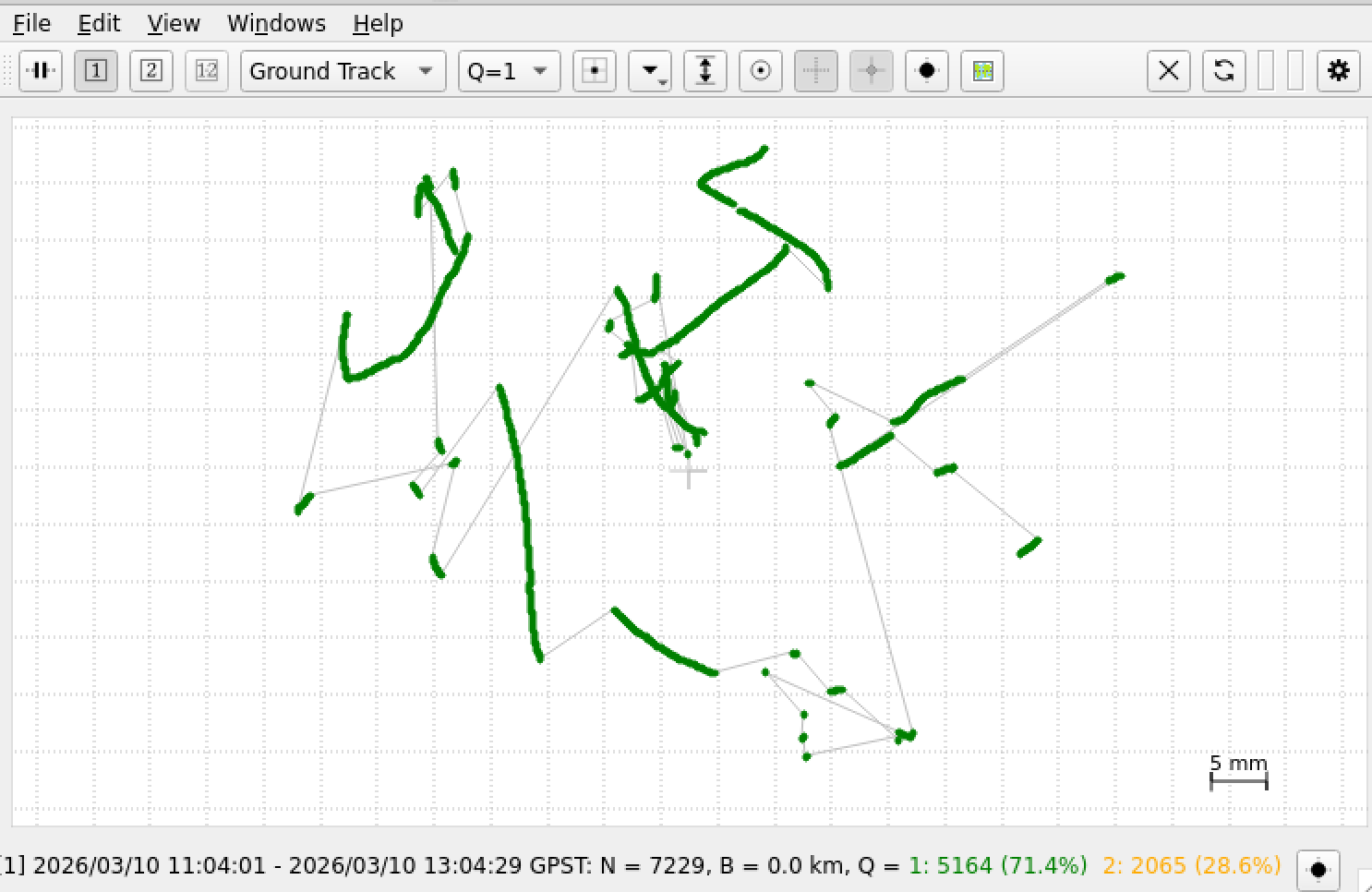
As we can see there are 71.4% of all points with Q = 1 that is status “FIX”. I took only those point for the calculation of the average value. The area is about 5 times 6 cm.
Note: The quality of your RTK fix depends heavily on the quality and proximity of the NTRIP caster. If you experience inconsistent results, double-check the coordinates provided by the caster’s mountpoint.
Tools at github:
A commandline tool to transform ecef wgs84 data.